<?xml version="1.0" encoding="utf-8"?><feed xmlns="http://www.w3.org/2005/Atom" ><generator uri="https://jekyllrb.com/" version="3.10.0">Jekyll</generator><link href="https://more-jekyll-theme.netlify.app/feed.xml" rel="self" type="application/atom+xml" /><link href="https://more-jekyll-theme.netlify.app/" rel="alternate" type="text/html" /><updated>2026-04-02T16:24:03+02:00</updated><id>https://more-jekyll-theme.netlify.app/feed.xml</id><title type="html">More</title><author><name>wu-mng</name></author><entry><title type="html">HTML Tags and Markdown Formatting</title><link href="https://more-jekyll-theme.netlify.app/markup/markup-html-tags-and-formatting" rel="alternate" type="text/html" title="HTML Tags and Markdown Formatting" /><published>2021-03-10T00:00:00+01:00</published><updated>2021-03-10T00:00:00+01:00</updated><id>https://more-jekyll-theme.netlify.app/markup/markup-html-tags-and-formatting</id><content type="html" xml:base="https://more-jekyll-theme.netlify.app/markup/markup-html-tags-and-formatting"><![CDATA[<p>A variety of common markup showing how the theme styles them.</p>

<h2 id="header-two">Header two</h2>

<h3 id="header-three">Header three</h3>

<h4 id="header-four">Header four</h4>

<h5 id="header-five">Header five</h5>

<h6 id="header-six">Header six</h6>

<p class="small">small text</p>

<p class="smaller">smaller text</p>

<!--more-->

<h2 id="blockquotes">Blockquotes</h2>

<p>Single line blockquote:</p>

<blockquote>
  <p>Software is like sex: it’s better when it’s free.</p>
</blockquote>

<p>Multi line blockquote with a cite reference:</p>

<blockquote>
  <p>Sharing knowledge is the most fundamental act of friendship. Because it is a way you can give something without loosing something.</p>

  <blockquote>
    <p>Richard Stallman</p>
  </blockquote>
</blockquote>

<h2 id="tables">Tables</h2>

<table>
  <thead>
    <tr>
      <th>#</th>
      <th>Person</th>
      <th>Idea</th>
    </tr>
  </thead>
  <tbody>
    <tr>
      <td>1</td>
      <td>Richard Stallman</td>
      <td>Gnu</td>
    </tr>
    <tr>
      <td>2</td>
      <td>Linus Torvalds</td>
      <td>Linux</td>
    </tr>
    <tr>
      <td>3</td>
      <td>Ian Murdock</td>
      <td>Debian</td>
    </tr>
    <tr>
      <td>4</td>
      <td>Bruce Perens</td>
      <td>Open Source</td>
    </tr>
  </tbody>
</table>

<table>
  <thead>
    <tr>
      <th style="text-align: left">Header1</th>
      <th style="text-align: center">Header2</th>
      <th style="text-align: right">Header3</th>
    </tr>
  </thead>
  <tbody>
    <tr>
      <td style="text-align: left">cell1</td>
      <td style="text-align: center">cell2</td>
      <td style="text-align: right">cell3</td>
    </tr>
    <tr>
      <td style="text-align: left">cell4</td>
      <td style="text-align: center">cell5</td>
      <td style="text-align: right">cell6</td>
    </tr>
  </tbody>
  <tbody>
    <tr>
      <td style="text-align: left">cell1</td>
      <td style="text-align: center">cell2</td>
      <td style="text-align: right">cell3</td>
    </tr>
    <tr>
      <td style="text-align: left">cell4</td>
      <td style="text-align: center">cell5</td>
      <td style="text-align: right">cell6</td>
    </tr>
  </tbody>
  <tfoot>
    <tr>
      <td style="text-align: left">Foot1</td>
      <td style="text-align: center">Foot2</td>
      <td style="text-align: right">Foot3</td>
    </tr>
  </tfoot>
</table>

<h2 id="definition-lists">Definition Lists</h2>

<dl>
  <dt>Definition List Title</dt>
  <dd>Definition list division.</dd>
  <dt>Startup</dt>
  <dd>A startup company or startup is a company or temporary organization designed to search for a repeatable and scalable business model.</dd>
  <dt>#dowork</dt>
  <dd>Coined by Rob Dyrdek and his personal body guard Christopher “Big Black” Boykins, “Do Work” works as a self motivator, to motivating your friends.</dd>
  <dt>Do It Live</dt>
  <dd>I’ll let Bill O’Reilly <a href="https://www.youtube.com/watch?v=O_HyZ5aW76c" title="We'll Do It Live">explain</a> this one.</dd>
</dl>

<h2 id="unordered-lists-nested">Unordered Lists (Nested)</h2>

<ul>
  <li>List item one
    <ul>
      <li>List item one
        <ul>
          <li>List item one</li>
          <li>List item two</li>
          <li>List item three</li>
          <li>List item four</li>
        </ul>
      </li>
      <li>List item two</li>
      <li>List item three</li>
      <li>List item four</li>
    </ul>
  </li>
  <li>List item two</li>
  <li>List item three</li>
  <li>List item four</li>
</ul>

<h2 id="ordered-list-nested">Ordered List (Nested)</h2>

<ol>
  <li>List item one
    <ol>
      <li>List item one
        <ol>
          <li>List item one</li>
          <li>List item two</li>
          <li>List item three</li>
          <li>List item four</li>
        </ol>
      </li>
      <li>List item two</li>
      <li>List item three</li>
      <li>List item four</li>
    </ol>
  </li>
  <li>List item two</li>
  <li>List item three</li>
  <li>List item four</li>
</ol>

<h2 id="html-tags">HTML Tags</h2>

<p><strong><code class="language-plaintext highlighter-rouge">&lt;address&gt;</code></strong></p>

<address>Provides contact information<br /> 
for a person or people<br /> or for an organization</address>

<p><strong><code class="language-plaintext highlighter-rouge">&lt;href&gt;</code></strong></p>

<p>This is an example of an <a href="https://www.linuxfoundation.org/" title="Linux">anchor tag or link</a>.</p>

<p><strong><code class="language-plaintext highlighter-rouge">&lt;abbr&gt;</code></strong></p>

<p>The abbreviation <abbr title="Cascading Style Sheets">CSS</abbr> stands for “Cascading Style Sheets”.</p>

<p><strong><code class="language-plaintext highlighter-rouge">&lt;cite&gt;</code></strong></p>

<p>“Code is poetry.” —<cite>Automattic</cite></p>

<p><strong><code class="language-plaintext highlighter-rouge">&lt;code&gt;</code></strong></p>

<p>You will learn later on in these tests that <code class="language-plaintext highlighter-rouge">word-wrap: break-word;</code> will be your best friend.</p>

<p><strong><code class="language-plaintext highlighter-rouge">&lt;del&gt;</code></strong></p>

<p>This tag will let you <del>strikeout text</del>.</p>

<p><strong><code class="language-plaintext highlighter-rouge">&lt;em&gt;</code></strong></p>

<p>The emphasize tag should <em>italicize</em> text.</p>

<p><strong><code class="language-plaintext highlighter-rouge">&lt;ins&gt;</code></strong></p>

<p>This tag should denote <ins>inserted</ins> text.</p>

<p><strong><code class="language-plaintext highlighter-rouge">&lt;kbd&gt;</code></strong></p>

<p>This scarcely known tag emulates <kbd>keyboard text</kbd>, which is usually styled like the <code class="language-plaintext highlighter-rouge">&lt;code&gt;</code> tag.</p>

<p><strong><code class="language-plaintext highlighter-rouge">&lt;pre&gt;</code></strong></p>

<p>This tag styles large blocks of code.</p>

<pre>
.post-title {
	margin: 0 0 5px;
	font-weight: bold;
	font-size: 38px;
	line-height: 1.2;
	and here's a line of some really, really, really, really long text, just to see how the PRE tag handles it and to find out how it overflows;
}
</pre>

<p><strong><code class="language-plaintext highlighter-rouge">&lt;q&gt;</code></strong></p>

<p><q>Just a short text, with automatically inserted quotation marks.</q></p>

<p><strong><code class="language-plaintext highlighter-rouge">&lt;strong&gt;</code></strong></p>

<p>This tag shows <strong>bold text</strong>.</p>

<p><strong><code class="language-plaintext highlighter-rouge">&lt;sub&gt;</code></strong></p>

<p>Getting our science styling on with H<sub>2</sub>O, which should push the “2” down.</p>

<p><strong><code class="language-plaintext highlighter-rouge">&lt;sup&gt;</code></strong></p>

<p>Still sticking with science and Albert Einstein’s E = MC<sup>2</sup>, which should lift the 2 up.</p>

<p><strong><code class="language-plaintext highlighter-rouge">&lt;var&gt;</code></strong></p>

<p>This allows you to denote <var>variables</var>.</p>]]></content><author><name>wu-mng</name></author><category term="Markup" /><category term="content" /><category term="css" /><category term="formatting" /><category term="html" /><category term="markup" /><media:thumbnail xmlns:media="http://search.yahoo.com/mrss/" url="https://more-jekyll-theme.netlify.app/assets/img/more_open_graph_default_image.png" /><media:content medium="image" url="https://more-jekyll-theme.netlify.app/assets/img/more_open_graph_default_image.png" xmlns:media="http://search.yahoo.com/mrss/" /></entry><entry><title type="html">Lightbox</title><link href="https://more-jekyll-theme.netlify.app/layout/layout-lightbox" rel="alternate" type="text/html" title="Lightbox" /><published>2021-02-17T00:00:00+01:00</published><updated>2021-02-17T00:00:00+01:00</updated><id>https://more-jekyll-theme.netlify.app/layout/layout-lightbox</id><content type="html" xml:base="https://more-jekyll-theme.netlify.app/layout/layout-lightbox"><![CDATA[<p><strong>More</strong> supports ligthboxes out-of-the-box (pun intended), all you have to do 
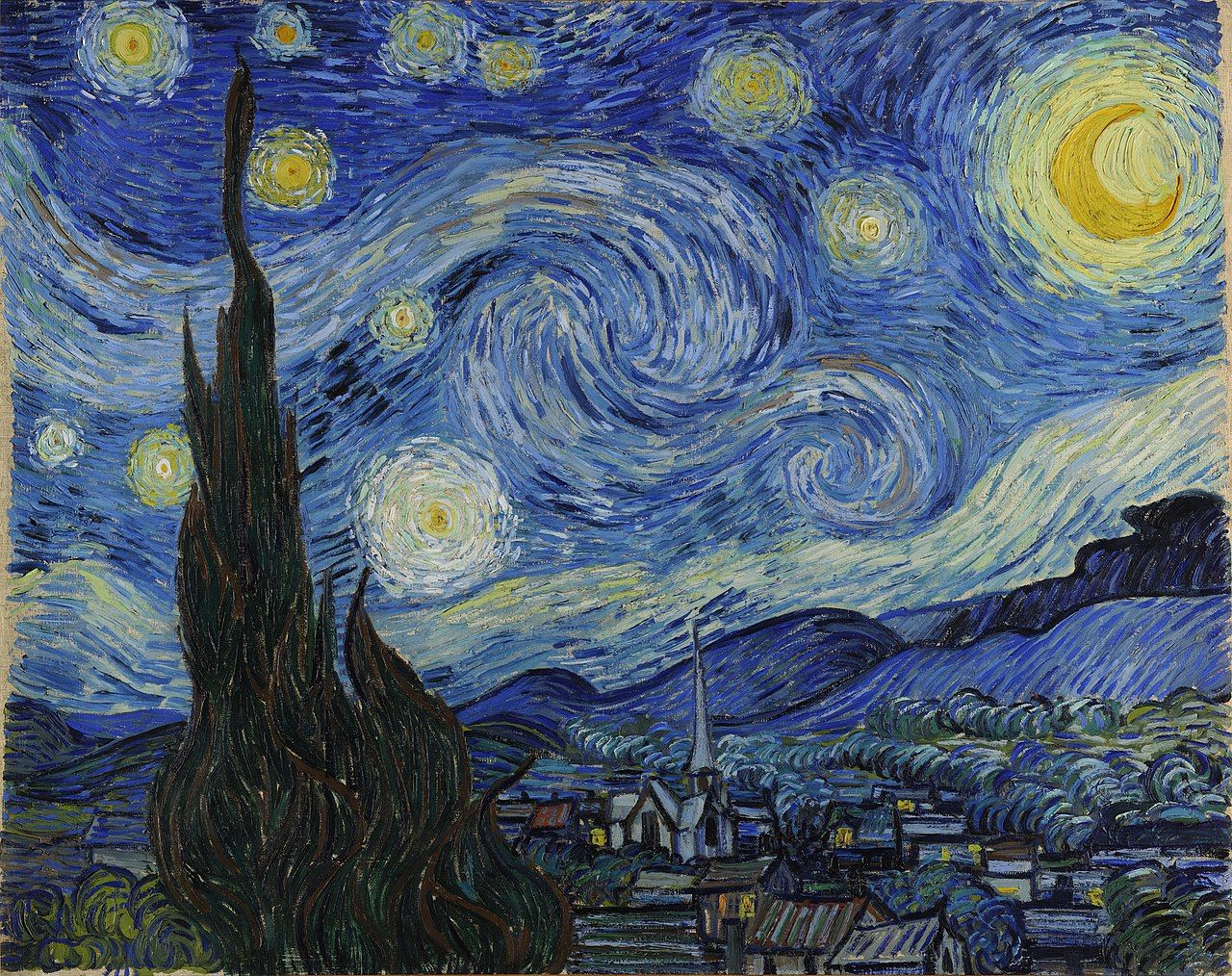
is add the <code class="language-plaintext highlighter-rouge">.lightbox</code> class to your image.</p>

<!--more-->

<p>However it is advisable to do so in combination with our own <a href="layout-responsive-images">responsive images</a>:</p>

<div class="language-plaintext highlighter-rouge"><div class="highlight"><pre class="highlight"><code>{% include image.html class="img-thumb lightbox" src="1280px-van_gogh_-_starry_night_-_google_art_project.jpg" alt="The painting..." %}
</code></pre></div></div>

<figure class="img-thumb lightbox" style="max-width:160px" aria-labelledby="1280px-van_gogh_-_starry_night_-_google_art_project.jpg">
  <img src="/assets/img/1280px-van_gogh_-_starry_night_-_google_art_project.jpg" alt="&quot;The Starry Night&quot; is an oil on canvas painting by Dutch Post-Impressionist painter Vincent van Gogh. Painted in June 1889, it depicts the view from the east-facing window of his asylum room at Saint-Rémy-de-Provence, just before sunrise, with the addition of an imaginary village." width="160" loading="lazy" />
  
    <figcaption id="1280px-van_gogh_-_starry_night_-_google_art_project.jpg">
      <p>“The Starry Night” by Vincent van Gogh
</p>
    </figcaption>
  
</figure>

<p>A few lines of text to put the image in context…Lorem ipsum dolor sit amet, consectetur adipisicing elit, sed doeiusmod tempor incididunt ut labore et dolore magna aliqua. Ut enimad minim veniam, quis nostrud exercitation ullamco laboris nisi utaliquip ex ea commodo consequat. Duis aute irure dolor inreprehenderit in voluptate velit esse cillum dolore eu fugiat nullapariatur. Excepteur sint occaecat cupidatat non proident, sunt inculpa qui officia deserunt mollit anim id est laborum. Lorem ipsum dolor sit amet, consectetur adipisicing elit, sed doeiusmod tempor incididunt ut labore et dolore magna aliqua. Ut enimad minim veniam, quis nostrud exercitation ullamco laboris nisi utaliquip ex ea commodo consequat. Duis aute irure dolor inreprehenderit in voluptate velit esse cillum dolore eu fugiat nullapariatur. Excepteur sint occaecat cupidatat non proident, sunt inculpa qui officia deserunt mollit anim id est laborum.</p>]]></content><author><name>wu-mng</name></author><category term="Layout" /><category term="images" /><category term="lightbox" /><category term="layout" /><media:thumbnail xmlns:media="http://search.yahoo.com/mrss/" url="https://more-jekyll-theme.netlify.app/assets/img/more_open_graph_default_image.png" /><media:content medium="image" url="https://more-jekyll-theme.netlify.app/assets/img/more_open_graph_default_image.png" xmlns:media="http://search.yahoo.com/mrss/" /></entry><entry><title type="html">Responsive Images</title><link href="https://more-jekyll-theme.netlify.app/layout/layout-responsive-images" rel="alternate" type="text/html" title="Responsive Images" /><published>2021-02-17T00:00:00+01:00</published><updated>2021-02-17T00:00:00+01:00</updated><id>https://more-jekyll-theme.netlify.app/layout/layout-responsive-images</id><content type="html" xml:base="https://more-jekyll-theme.netlify.app/layout/layout-responsive-images"><![CDATA[<p><strong>More</strong> is capable of generating responsive images (multiple copies, 
at different sizes, of a picture) that will always suit every screen 
and device perfectly. But how to use them?</p>

<!--more-->

<ul>
  <li>First, switch on responsive images in <code class="language-plaintext highlighter-rouge">_config.yml</code>:</li>
</ul>

<div class="language-yaml highlighter-rouge"><div class="highlight"><pre class="highlight"><code>  <span class="na">responsive_images</span><span class="pi">:</span> 
    <span class="na">active</span><span class="pi">:</span> <span class="no">true</span>
</code></pre></div></div>

<ul>
  <li>Place your images in <code class="language-plaintext highlighter-rouge">/assets/images/uploads/</code></li>
  <li>Start the npm script by typing <code class="language-plaintext highlighter-rouge">npm run rig</code> while in the <code class="language-plaintext highlighter-rouge">/npm</code> directory</li>
  <li>Restart Jekyll</li>
</ul>

<p>(…ok, a bit convoluted, I know, but we’re working on an automated process…).</p>

<p>Note that <strong>npm</strong> needs to be installed in your system, refer to <a href="https://www.npmjs.com/get-npm">https://www.npmjs.com/get-npm</a> for instructions.</p>

<p>Also be aware that the original files will be optimized, and then <strong>deleted</strong>;
see <code class="language-plaintext highlighter-rouge">npm/uploads_cleanup.js</code> for more informations.</p>

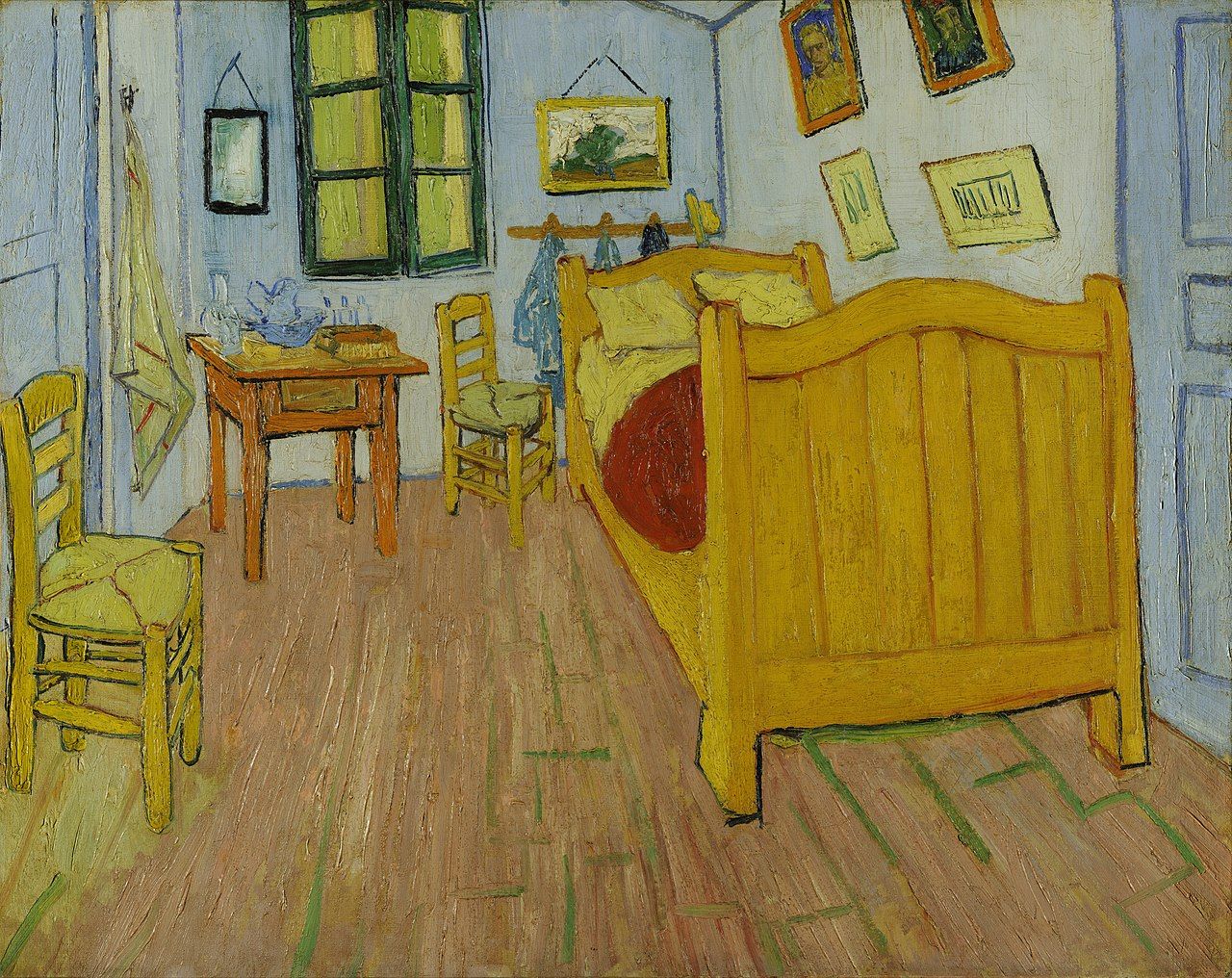
<p>But let’s see how this works in practice. A <strong>medium</strong> sized image is the default value, 
and since it fill all the available space, it doesn’t need any alignment:</p>

<div class="language-plaintext highlighter-rouge"><div class="highlight"><pre class="highlight"><code>{% include image.html src="1280px-vincent_van_gogh_-_de_slaapkamer_-_google_art_project.jpg" alt="The painting..." %}
</code></pre></div></div>

<figure class="" style="max-width:640px">
  <img src="/assets/img/1280px-vincent_van_gogh_-_de_slaapkamer_-_google_art_project.jpg" alt="The painting &amp;quot;The Bedroom&amp;quot;, realized by Vincent van Gogh in 1888, depicts his bedroom in Arles, France. The door to the right opened on to the upper floor and the staircase; the door to the left was that of the guest room he held prepared for Gauguin; the window in the front wall looked on to Place Lamartine and its public gardens." width="640" loading="lazy" />
  
</figure>

<p>A <strong>small</strong> image is <strong>aligned</strong> to the <strong>left</strong> by default:</p>

<div class="language-plaintext highlighter-rouge"><div class="highlight"><pre class="highlight"><code>{% include image.html class="img-small" src="1280px-vincent..." alt="The painting..."
</code></pre></div></div>

<figure class="img-small" style="max-width:320px">
  <img src="/assets/img/1280px-vincent_van_gogh_-_de_slaapkamer_-_google_art_project.jpg" alt="The painting &amp;quot;The Bedroom&amp;quot;, realized by Vincent van Gogh in 1888, depicts his bedroom in Arles, France. The door to the right opened on to the upper floor and the staircase; the door to the left was that of the guest room he held prepared for Gauguin; the window in the front wall looked on to Place Lamartine and its public gardens." width="320" loading="lazy" />
  
</figure>

<p>Lorem ipsum dolor sit amet, consectetur adipisicing elit, sed doeiusmod tempor incididunt ut labore et dolore magna aliqua. Ut enimad minim veniam, quis nostrud exercitation ullamco laboris nisi utaliquip ex ea commodo consequat. Duis aute irure dolor inreprehenderit in voluptate velit esse cillum dolore eu fugiat nullapariatur. Excepteur sint occaecat cupidatat non proident, sunt inculpa qui officia deserunt mollit anim id est laborum. Lorem ipsum dolor sit amet, consectetur adipisicing elit, sed doeiusmod tempor incididunt ut labore et dolore magna aliqua. Ut enimad minim veniam, quis nostrud exercitation ullamco laboris nisi utaliquip ex ea commodo consequat. Duis aute irure dolor inreprehenderit in voluptate velit esse cillum dolore eu fugiat nullapariatur. Excepteur sint occaecat cupidatat non proident, sunt inculpa qui officia deserunt mollit anim id est laborum.</p>

<p>And now, for a perfectly <strong>centered</strong> image:</p>

<div class="language-plaintext highlighter-rouge"><div class="highlight"><pre class="highlight"><code>{% include image.html class="img-small center" src="1280px-vincent..." %}
</code></pre></div></div>

<figure class="img-small center" style="max-width:320px">
  <img src="/assets/img/1280px-vincent_van_gogh_-_de_slaapkamer_-_google_art_project.jpg" alt="The painting &amp;quot;The Bedroom&amp;quot;, realized by Vincent van Gogh in 1888, depicts his bedroom in Arles, France. The door to the right opened on to the upper floor and the staircase; the door to the left was that of the guest room he held prepared for Gauguin; the window in the front wall looked on to Place Lamartine and its public gardens." width="320" loading="lazy" />
  
</figure>

<p>or a <strong>right</strong> leaning one; let’s also add a <strong>caption</strong>, for a change:</p>

<div class="language-plaintext highlighter-rouge"><div class="highlight"><pre class="highlight"><code>{% include image.html class="img-small right" src="1280px-vincent..." caption='"The Bedroom in Arles" (first version) by Vincent Van Gogh - public domain image' %}
</code></pre></div></div>

<figure class="img-small right" style="max-width:320px" aria-labelledby="1280px-vincent_van_gogh_-_de_slaapkamer_-_google_art_project.jpg">
  <img src="/assets/img/1280px-vincent_van_gogh_-_de_slaapkamer_-_google_art_project.jpg" alt="The painting &amp;quot;The Bedroom&amp;quot;, realized by Vincent van Gogh in 1888, depicts his bedroom in Arles, France. The door to the right opened on to the upper floor and the staircase; the door to the left was that of the guest room he held prepared for Gauguin; the window in the front wall looked on to Place Lamartine and its public gardens." width="320" loading="lazy" />
  
    <figcaption id="1280px-vincent_van_gogh_-_de_slaapkamer_-_google_art_project.jpg">
      <p>“The Bedroom in Arles” (first version) by Vincent Van Gogh - public domain image
</p>
    </figcaption>
  
</figure>

<p>Lorem ipsum dolor sit amet, consectetur adipisicing elit, sed doeiusmod tempor incididunt ut labore et dolore magna aliqua. Ut enimad minim veniam, quis nostrud exercitation ullamco laboris nisi utaliquip ex ea commodo consequat. Duis aute irure dolor inreprehenderit in voluptate velit esse cillum dolore eu fugiat nullapariatur. Excepteur sint occaecat cupidatat non proident, sunt inculpa qui officia deserunt mollit anim id est laborum. Lorem ipsum dolor sit amet, consectetur adipisicing elit, sed doeiusmod tempor incididunt ut labore et dolore magna aliqua. Ut enimad minim veniam, quis nostrud exercitation ullamco laboris nisi utaliquip ex ea commodo consequat. Duis aute irure dolor inreprehenderit in voluptate velit esse cillum dolore eu fugiat nullapariatur. Excepteur sint occaecat cupidatat non proident, sunt inculpa qui officia deserunt mollit anim id est laborum.</p>

<p>Well, you get the gist of it… but before we wrap it up, let me introduce you the <strong>thumbnail</strong>:</p>
<div class="language-plaintext highlighter-rouge"><div class="highlight"><pre class="highlight"><code>{% include image.html class="img-thumb" src="1280px-vincent..." %}
</code></pre></div></div>

<figure class="img-thumb" style="max-width:160px">
  <img src="/assets/img/1280px-vincent_van_gogh_-_de_slaapkamer_-_google_art_project.jpg" alt="The painting &amp;quot;The Bedroom&amp;quot;, realized by Vincent van Gogh in 1888, depicts his bedroom in Arles, France. The door to the right opened on to the upper floor and the staircase; the door to the left was that of the guest room he held prepared for Gauguin; the window in the front wall looked on to Place Lamartine and its public gardens." width="160" loading="lazy" />
  
</figure>

<p>Lorem ipsum dolor sit amet, consectetur adipisicing elit, sed doeiusmod tempor incididunt ut labore et dolore magna aliqua. Ut enimad minim veniam, quis nostrud exercitation ullamco laboris nisi utaliquip ex ea commodo consequat. Duis aute irure dolor inreprehenderit in voluptate velit esse cillum dolore eu fugiat nullapariatur. Excepteur sint occaecat cupidatat non proident, sunt inculpa qui officia deserunt mollit anim id est laborum. Lorem ipsum dolor sit amet, consectetur adipisicing elit, sed doeiusmod tempor incididunt ut labore et dolore magna aliqua. Ut enimad minim veniam, quis nostrud exercitation ullamco laboris nisi utaliquip ex ea commodo consequat. Duis aute irure dolor inreprehenderit in voluptate velit esse cillum dolore eu fugiat nullapariatur. Excepteur sint occaecat cupidatat non proident, sunt inculpa qui officia deserunt mollit anim id est laborum.</p>

<p>Of course it’s possible to <strong>center</strong> and <strong>caption</strong> the thumbnails as well:</p>
<div class="language-plaintext highlighter-rouge"><div class="highlight"><pre class="highlight"><code>{% include image.html class="img-thumb center" src="1280px-vincent..." caption='"The Bedroom in Arles"...' %}
</code></pre></div></div>

<figure class="img-thumb center" style="max-width:160px" aria-labelledby="1280px-vincent_van_gogh_-_de_slaapkamer_-_google_art_project.jpg">
  <img src="/assets/img/1280px-vincent_van_gogh_-_de_slaapkamer_-_google_art_project.jpg" alt="The painting &amp;quot;The Bedroom&amp;quot;, realized by Vincent van Gogh in 1888, depicts his bedroom in Arles, France. The door to the right opened on to the upper floor and the staircase; the door to the left was that of the guest room he held prepared for Gauguin; the window in the front wall looked on to Place Lamartine and its public gardens." width="160" loading="lazy" />
  
    <figcaption id="1280px-vincent_van_gogh_-_de_slaapkamer_-_google_art_project.jpg">
      <p>“The Bedroom in Arles” (first version) by Vincent Van Gogh - public domain image
</p>
    </figcaption>
  
</figure>

<p>You might be wondering: what if I don’t have a wall of text like your <em>lorem ipsum</em>,
how will the text wrap properly around the image?</p>

<p>Let’s take, as an example, a <strong>right</strong> aligned thumbnail with a shorter text:</p>
<div class="language-plaintext highlighter-rouge"><div class="highlight"><pre class="highlight"><code>{% include image.html class="img-thumb right" src="1280px-vincent..." %}
</code></pre></div></div>

<figure class="img-thumb right" style="max-width:160px">
  <img src="/assets/img/1280px-vincent_van_gogh_-_de_slaapkamer_-_google_art_project.jpg" alt="The painting &amp;quot;The Bedroom&amp;quot;, realized by Vincent van Gogh in 1888, depicts his bedroom in Arles, France. The door to the right opened on to the upper floor and the staircase; the door to the left was that of the guest room he held prepared for Gauguin; the window in the front wall looked on to Place Lamartine and its public gardens." width="160" loading="lazy" />
  
</figure>

<p>Lorem ipsum dolor sit amet, consectetur adipisicing elit, sed doeiusmod tempor incididunt ut labore et dolore magna aliqua.</p>

<p class="clear">Now, how does <strong>this very text</strong> gets to hang around here, and <strong>not wrap around</strong> the
image? Well, that’s because it has a <code class="language-plaintext highlighter-rouge">.clear</code> class… to use it, put this just
after the paragraph:</p>
<div class="language-plaintext highlighter-rouge"><div class="highlight"><pre class="highlight"><code>(...)
to use it, put this just after the paragraph:
{: .clear }
</code></pre></div></div>

<p>And this concludes our tour. Enjoy your responsive images!</p>]]></content><author><name>wu-mng</name></author><category term="Layout" /><category term="images" /><category term="responsive images" /><category term="layout" /><media:thumbnail xmlns:media="http://search.yahoo.com/mrss/" url="https://more-jekyll-theme.netlify.app/assets/img/more_open_graph_default_image.png" /><media:content medium="image" url="https://more-jekyll-theme.netlify.app/assets/img/more_open_graph_default_image.png" xmlns:media="http://search.yahoo.com/mrss/" /></entry><entry><title type="html">Demo Post</title><link href="https://more-jekyll-theme.netlify.app/markup/set-every-variable-post-front-matter-now-with-custom-slug" rel="alternate" type="text/html" title="Demo Post" /><published>2020-10-13T00:00:00+02:00</published><updated>2020-10-13T00:00:00+02:00</updated><id>https://more-jekyll-theme.netlify.app/markup/set-every-variable-post-front-matter-now-with-custom-slug</id><content type="html" xml:base="https://more-jekyll-theme.netlify.app/markup/set-every-variable-post-front-matter-now-with-custom-slug"><![CDATA[<p>Lorem ipsum dolor sit amet, consectetur adipisicing elit, sed doeiusmod tempor incididunt ut labore et dolore magna aliqua. Ut enimad minim veniam, quis nostrud exercitation ullamco laboris nisi utaliquip ex ea commodo consequat. Duis aute irure dolor inreprehenderit in voluptate velit esse cillum dolore eu fugiat nullapariatur.</p>

<p>Here’s what the post’s Front Matter looks like:</p>
<div class="language-yaml highlighter-rouge"><div class="highlight"><pre class="highlight"><code><span class="nn">---</span>
<span class="na">title</span><span class="pi">:</span> <span class="s2">"</span><span class="s">Demo</span><span class="nv"> </span><span class="s">Post"</span>
<span class="na">tagline</span><span class="pi">:</span> <span class="s2">"</span><span class="s">that</span><span class="nv"> </span><span class="s">makes</span><span class="nv"> </span><span class="s">use</span><span class="nv"> </span><span class="s">of</span><span class="nv"> </span><span class="s">every</span><span class="nv"> </span><span class="s">option</span><span class="nv"> </span><span class="s">in</span><span class="nv"> </span><span class="s">Front</span><span class="nv"> </span><span class="s">Matter"</span>
<span class="na">author</span><span class="pi">:</span> <span class="s">An Author</span>
<span class="na">image</span><span class="pi">:</span> <span class="s">assets/img/1280px-vincent_van_gogh_-_de_slaapkamer_-_google_art_project.jpg</span>
<span class="na">alt</span><span class="pi">:</span> <span class="s">This is the alt text of a featured image.</span>
<span class="na">caption</span><span class="pi">:</span> <span class="s">This is the **caption** text of a featured image.</span>
<span class="na">excerpt</span><span class="pi">:</span> <span class="s">This article sets any possible variable in the post's Front Matter. Also, as part of the demo, this is a manually written `excerpt`... and it even contains some **markdown** and &lt;strong&gt;HTML&lt;/strong&gt; formatting in it. Clever, innit?</span>
<span class="na">slug</span><span class="pi">:</span> <span class="s">set-every-variable-post-front-matter-now-with-custom-slug</span>
<span class="na">categories</span><span class="pi">:</span>
  <span class="pi">-</span> <span class="s">Markup</span>
<span class="na">tags</span><span class="pi">:</span>
  <span class="pi">-</span> <span class="s">front matter</span>
  <span class="pi">-</span> <span class="s">markup</span>
  <span class="pi">-</span> <span class="s">variables</span>
<span class="na">sticky</span><span class="pi">:</span> <span class="no">true</span>
<span class="nn">---</span>
</code></pre></div></div>]]></content><author><name>An Author</name></author><category term="Markup" /><category term="front matter" /><category term="markup" /><category term="variables" /><summary type="html"><![CDATA[This article sets any possible variable in the post's Front Matter. Also, as part of the demo, this is a manually written `excerpt`... and it even contains some **markdown** and HTML formatting in it. Clever, innit?]]></summary><media:thumbnail xmlns:media="http://search.yahoo.com/mrss/" url="https://more-jekyll-theme.netlify.app/assets/img/1280px-vincent_van_gogh_-_de_slaapkamer_-_google_art_project.jpg" /><media:content medium="image" url="https://more-jekyll-theme.netlify.app/assets/img/1280px-vincent_van_gogh_-_de_slaapkamer_-_google_art_project.jpg" xmlns:media="http://search.yahoo.com/mrss/" /></entry><entry><title type="html">Sticky Post</title><link href="https://more-jekyll-theme.netlify.app/markup/sticky-post" rel="alternate" type="text/html" title="Sticky Post" /><published>2020-09-08T00:00:00+02:00</published><updated>2020-09-08T00:00:00+02:00</updated><id>https://more-jekyll-theme.netlify.app/markup/sticky-post</id><content type="html" xml:base="https://more-jekyll-theme.netlify.app/markup/sticky-post"><![CDATA[<p>This is a sticky post: it must show at the beginning of the index page, regardless of its publishing date.</p>

<p>It’s possible to give it a distinctive style using the <code class="language-plaintext highlighter-rouge">.sticky</code> class.</p>]]></content><author><name>Another Author</name></author><category term="Markup" /><category term="markup" /><category term="sticky post" /><media:thumbnail xmlns:media="http://search.yahoo.com/mrss/" url="https://more-jekyll-theme.netlify.app/assets/img/more_open_graph_default_image.png" /><media:content medium="image" url="https://more-jekyll-theme.netlify.app/assets/img/more_open_graph_default_image.png" xmlns:media="http://search.yahoo.com/mrss/" /></entry><entry><title type="html">Syntax Highlighting</title><link href="https://more-jekyll-theme.netlify.app/markup/markup-syntax-highlighting" rel="alternate" type="text/html" title="Syntax Highlighting" /><published>2013-08-16T00:00:00+02:00</published><updated>2013-08-16T00:00:00+02:00</updated><id>https://more-jekyll-theme.netlify.app/markup/markup-syntax-highlighting</id><content type="html" xml:base="https://more-jekyll-theme.netlify.app/markup/markup-syntax-highlighting"><![CDATA[<p>Syntax highlighting is a feature that displays source code, in different colors and fonts according to the category of terms. This feature facilitates writing in a structured language such as a programming language or a markup language as both structures and syntax errors are visually distinct. Highlighting does not affect the meaning of the text itself; it is intended only for human readers.<sup id="fnref:1" role="doc-noteref"><a href="#fn:1" class="footnote" rel="footnote">1</a></sup></p>

<h3 id="gfm-code-blocks">GFM Code Blocks</h3>

<p>GitHub Flavored Markdown <a href="https://help.github.com/articles/creating-and-highlighting-code-blocks/">fenced code blocks</a> are supported. To modify styling and highlight colors edit <code class="language-plaintext highlighter-rouge">/_sass/_highlighter.scss</code>.</p>

<p><code class="language-plaintext highlighter-rouge">css</code></p>

<div class="language-css highlighter-rouge"><div class="highlight"><pre class="highlight"><code><span class="nf">#container</span> <span class="p">{</span>
  <span class="nl">float</span><span class="p">:</span> <span class="nb">left</span><span class="p">;</span>
  <span class="nl">margin</span><span class="p">:</span> <span class="m">0</span> <span class="m">-240px</span> <span class="m">0</span> <span class="m">0</span><span class="p">;</span>
  <span class="nl">width</span><span class="p">:</span> <span class="m">100%</span><span class="p">;</span>
<span class="p">}</span>
</code></pre></div></div>

<p><code class="language-plaintext highlighter-rouge">scss</code></p>

<figure class="highlight"><pre><code class="language-scss" data-lang="scss"><span class="nc">.highlight</span> <span class="p">{</span>
  <span class="nl">margin</span><span class="p">:</span> <span class="m">0</span><span class="p">;</span>
  <span class="nl">padding</span><span class="p">:</span> <span class="m">1em</span><span class="p">;</span>
  <span class="nl">font-family</span><span class="p">:</span> <span class="nv">$monospace</span><span class="p">;</span>
  <span class="nl">font-size</span><span class="p">:</span> <span class="nv">$type-size-7</span><span class="p">;</span>
  <span class="nl">line-height</span><span class="p">:</span> <span class="m">1</span><span class="mi">.8</span><span class="p">;</span>
<span class="p">}</span></code></pre></figure>

<p><code class="language-plaintext highlighter-rouge">html</code></p>

<div class="language-html highlighter-rouge"><div class="highlight"><pre class="highlight"><code><span class="nt">&lt;nav</span> <span class="na">class=</span><span class="s">"pagination"</span> <span class="na">role=</span><span class="s">"navigation"</span><span class="nt">&gt;</span>
  {% if page.previous %}
    <span class="nt">&lt;a</span> <span class="na">href=</span><span class="s">"{{ site.url }}{{ page.previous.url }}"</span> <span class="na">class=</span><span class="s">"btn"</span> <span class="na">title=</span><span class="s">"{{ page.previous.title }}"</span><span class="nt">&gt;</span>Previous article<span class="nt">&lt;/a&gt;</span>
  {% endif %}
  {% if page.next %}
    <span class="nt">&lt;a</span> <span class="na">href=</span><span class="s">"{{ site.url }}{{ page.next.url }}"</span> <span class="na">class=</span><span class="s">"btn"</span> <span class="na">title=</span><span class="s">"{{ page.next.title }}"</span><span class="nt">&gt;</span>Next article<span class="nt">&lt;/a&gt;</span>
  {% endif %}
<span class="nt">&lt;/nav&gt;</span><span class="c">&lt;!-- /.pagination --&gt;</span>
</code></pre></div></div>

<p><code class="language-plaintext highlighter-rouge">ruby</code></p>

<div class="language-ruby highlighter-rouge"><div class="highlight"><pre class="highlight"><code><span class="k">module</span> <span class="nn">Jekyll</span>
  <span class="k">class</span> <span class="nc">TagIndex</span> <span class="o">&lt;</span> <span class="no">Page</span>
    <span class="k">def</span> <span class="nf">initialize</span><span class="p">(</span><span class="n">site</span><span class="p">,</span> <span class="n">base</span><span class="p">,</span> <span class="n">dir</span><span class="p">,</span> <span class="n">tag</span><span class="p">)</span>
      <span class="vi">@site</span> <span class="o">=</span> <span class="n">site</span>
      <span class="vi">@base</span> <span class="o">=</span> <span class="n">base</span>
      <span class="vi">@dir</span> <span class="o">=</span> <span class="n">dir</span>
      <span class="vi">@name</span> <span class="o">=</span> <span class="s1">'index.html'</span>
      <span class="nb">self</span><span class="p">.</span><span class="nf">process</span><span class="p">(</span><span class="vi">@name</span><span class="p">)</span>
      <span class="nb">self</span><span class="p">.</span><span class="nf">read_yaml</span><span class="p">(</span><span class="no">File</span><span class="p">.</span><span class="nf">join</span><span class="p">(</span><span class="n">base</span><span class="p">,</span> <span class="s1">'_layouts'</span><span class="p">),</span> <span class="s1">'tag_index.html'</span><span class="p">)</span>
      <span class="nb">self</span><span class="p">.</span><span class="nf">data</span><span class="p">[</span><span class="s1">'tag'</span><span class="p">]</span> <span class="o">=</span> <span class="n">tag</span>
      <span class="n">tag_title_prefix</span> <span class="o">=</span> <span class="n">site</span><span class="p">.</span><span class="nf">config</span><span class="p">[</span><span class="s1">'tag_title_prefix'</span><span class="p">]</span> <span class="o">||</span> <span class="s1">'Tagged: '</span>
      <span class="n">tag_title_suffix</span> <span class="o">=</span> <span class="n">site</span><span class="p">.</span><span class="nf">config</span><span class="p">[</span><span class="s1">'tag_title_suffix'</span><span class="p">]</span> <span class="o">||</span> <span class="s1">'&amp;#8211;'</span>
      <span class="nb">self</span><span class="p">.</span><span class="nf">data</span><span class="p">[</span><span class="s1">'title'</span><span class="p">]</span> <span class="o">=</span> <span class="s2">"</span><span class="si">#{</span><span class="n">tag_title_prefix</span><span class="si">}#{</span><span class="n">tag</span><span class="si">}</span><span class="s2">"</span>
      <span class="nb">self</span><span class="p">.</span><span class="nf">data</span><span class="p">[</span><span class="s1">'description'</span><span class="p">]</span> <span class="o">=</span> <span class="s2">"An archive of posts tagged </span><span class="si">#{</span><span class="n">tag</span><span class="si">}</span><span class="s2">."</span>
    <span class="k">end</span>
  <span class="k">end</span>
<span class="k">end</span>
</code></pre></div></div>

<h3 id="code-blocks-in-lists">Code Blocks in Lists</h3>

<p>Indentation matters. Be sure the indent of the code block aligns with the first non-space character after the list item marker (e.g., <code class="language-plaintext highlighter-rouge">1.</code>). Usually this will mean indenting 3 spaces instead of 4.</p>

<ol>
  <li>Do step 1.</li>
  <li>
    <p>Now do this:</p>

    <div class="language-ruby highlighter-rouge"><div class="highlight"><pre class="highlight"><code><span class="k">def</span> <span class="nf">print_hi</span><span class="p">(</span><span class="nb">name</span><span class="p">)</span>
  <span class="nb">puts</span> <span class="s2">"Hi, </span><span class="si">#{</span><span class="nb">name</span><span class="si">}</span><span class="s2">"</span>
<span class="k">end</span>
<span class="n">print_hi</span><span class="p">(</span><span class="s1">'Tom'</span><span class="p">)</span>
<span class="c1">#=&gt; prints 'Hi, Tom' to STDOUT.</span>
</code></pre></div>    </div>
  </li>
  <li>Now you can do this.</li>
</ol>

<h3 id="jekyll-highlight-tag">Jekyll Highlight Tag</h3>

<p>An example of a code blocking using Jekyll’s <a href="https://jekyllrb.com/docs/templates/#code-snippet-highlighting"><code class="language-plaintext highlighter-rouge">{% highlight %}</code> tag</a>.</p>

<figure class="highlight"><pre><code class="language-javascript" data-lang="javascript"><table class="rouge-table"><tbody><tr><td class="gutter gl"><pre class="lineno">1
2
3
4
5
6
7
8
9
10
11
12
13
14
15
16
17
18
19
20
21
22
</pre></td><td class="code"><pre><span class="c1">// 'gulp html' -- does nothing</span>
<span class="c1">// 'gulp html --prod' -- minifies and gzips HTML files for production</span>
<span class="nx">gulp</span><span class="p">.</span><span class="nx">task</span><span class="p">(</span><span class="dl">'</span><span class="s1">html</span><span class="dl">'</span><span class="p">,</span> <span class="p">()</span> <span class="o">=&gt;</span> <span class="p">{</span>
  <span class="k">return</span> <span class="nx">gulp</span><span class="p">.</span><span class="nx">src</span><span class="p">(</span><span class="nx">paths</span><span class="p">.</span><span class="nx">siteFolderName</span> <span class="o">+</span> <span class="nx">paths</span><span class="p">.</span><span class="nx">htmlPattern</span><span class="p">)</span>
    <span class="p">.</span><span class="nx">pipe</span><span class="p">(</span><span class="nx">when</span><span class="p">(</span><span class="nx">argv</span><span class="p">.</span><span class="nx">prod</span><span class="p">,</span> <span class="nx">htmlmin</span><span class="p">({</span>
      <span class="na">removeComments</span><span class="p">:</span> <span class="kc">true</span><span class="p">,</span>
      <span class="na">collapseWhitespace</span><span class="p">:</span> <span class="kc">true</span><span class="p">,</span>
      <span class="na">collapseBooleanAttributes</span><span class="p">:</span> <span class="kc">false</span><span class="p">,</span>
      <span class="na">removeAttributeQuotes</span><span class="p">:</span> <span class="kc">false</span><span class="p">,</span>
      <span class="na">removeRedundantAttributes</span><span class="p">:</span> <span class="kc">false</span><span class="p">,</span>
      <span class="na">minifyJS</span><span class="p">:</span> <span class="kc">true</span><span class="p">,</span>
      <span class="na">minifyCSS</span><span class="p">:</span> <span class="kc">true</span>
    <span class="p">})))</span>
    <span class="p">.</span><span class="nx">pipe</span><span class="p">(</span><span class="nx">when</span><span class="p">(</span><span class="nx">argv</span><span class="p">.</span><span class="nx">prod</span><span class="p">,</span> <span class="nx">size</span><span class="p">({</span><span class="na">title</span><span class="p">:</span> <span class="dl">'</span><span class="s1">optimized HTML</span><span class="dl">'</span><span class="p">})))</span>
    <span class="p">.</span><span class="nx">pipe</span><span class="p">(</span><span class="nx">when</span><span class="p">(</span><span class="nx">argv</span><span class="p">.</span><span class="nx">prod</span><span class="p">,</span> <span class="nx">gulp</span><span class="p">.</span><span class="nx">dest</span><span class="p">(</span><span class="nx">paths</span><span class="p">.</span><span class="nx">siteFolderName</span><span class="p">)))</span>
    <span class="p">.</span><span class="nx">pipe</span><span class="p">(</span><span class="nx">when</span><span class="p">(</span><span class="nx">argv</span><span class="p">.</span><span class="nx">prod</span><span class="p">,</span> <span class="nx">gzip</span><span class="p">({</span><span class="na">append</span><span class="p">:</span> <span class="kc">true</span><span class="p">})))</span>
    <span class="p">.</span><span class="nx">pipe</span><span class="p">(</span><span class="nx">when</span><span class="p">(</span><span class="nx">argv</span><span class="p">.</span><span class="nx">prod</span><span class="p">,</span> <span class="nx">size</span><span class="p">({</span>
      <span class="na">title</span><span class="p">:</span> <span class="dl">'</span><span class="s1">gzipped HTML</span><span class="dl">'</span><span class="p">,</span>
      <span class="na">gzip</span><span class="p">:</span> <span class="kc">true</span>
    <span class="p">})))</span>
    <span class="p">.</span><span class="nx">pipe</span><span class="p">(</span><span class="nx">when</span><span class="p">(</span><span class="nx">argv</span><span class="p">.</span><span class="nx">prod</span><span class="p">,</span> <span class="nx">gulp</span><span class="p">.</span><span class="nx">dest</span><span class="p">(</span><span class="nx">paths</span><span class="p">.</span><span class="nx">siteFolderName</span><span class="p">)))</span>
<span class="p">});</span>
</pre></td></tr></tbody></table></code></pre></figure>

<figure class="highlight"><pre><code class="language-wl" data-lang="wl"><table class="rouge-table"><tbody><tr><td class="gutter gl"><pre class="lineno">1
2
3
4
</pre></td><td class="code"><pre><span class="bp">Module</span><span class="p">[{}</span><span class="o">,</span><span class="w">
  </span><span class="nb">Sqrt</span><span class="p">[</span><span class="m">2</span><span class="p">]</span><span class="w">
  </span><span class="m">4</span><span class="w">
</span><span class="p">]</span>
</pre></td></tr></tbody></table></code></pre></figure>

<h3 id="github-gist-embed">GitHub Gist Embed</h3>

<p>An example of a Gist embed below.</p>

<script src="https://gist.github.com/mmistakes/77c68fbb07731a456805a7b473f47841.js"></script>

<div class="footnotes" role="doc-endnotes">
  <ol>
    <li id="fn:1" role="doc-endnote">
      <p><a href="http://en.wikipedia.org/wiki/Syntax_highlighting">http://en.wikipedia.org/wiki/Syntax_highlighting</a> <a href="#fnref:1" class="reversefootnote" role="doc-backlink">&#8617;</a></p>
    </li>
  </ol>
</div>]]></content><author><name>Michael Rose</name></author><category term="Markup" /><category term="code" /><category term="syntax highlighting" /><summary type="html"><![CDATA[Post displaying the various ways of highlighting code in Markdown.]]></summary><media:thumbnail xmlns:media="http://search.yahoo.com/mrss/" url="https://more-jekyll-theme.netlify.app/assets/img/more_open_graph_default_image.png" /><media:content medium="image" url="https://more-jekyll-theme.netlify.app/assets/img/more_open_graph_default_image.png" xmlns:media="http://search.yahoo.com/mrss/" /></entry><entry><title type="html">Image Alignment</title><link href="https://more-jekyll-theme.netlify.app/markup/markup-image-alignment" rel="alternate" type="text/html" title="Image Alignment" /><published>2013-01-10T00:00:00+01:00</published><updated>2013-01-10T00:00:00+01:00</updated><id>https://more-jekyll-theme.netlify.app/markup/markup-image-alignment</id><content type="html" xml:base="https://more-jekyll-theme.netlify.app/markup/markup-image-alignment"><![CDATA[<p>Welcome to image alignment! The best way to demonstrate the ebb and flow of the various image positioning options is to nestle them snuggly among an ocean of words. Grab a paddle and let’s get started.</p>

<!--more-->

<p><img src="https://more-jekyll-theme.netlify.app/assets/img/image-alignment-580x300.jpg" alt="image-center" class="align-center" /></p>

<p>The image above happens to be <strong>centered</strong>.</p>

<p><img src="https://more-jekyll-theme.netlify.app/assets/img/image-alignment-150x150.jpg" alt="img-left" class="align-left" /> The rest of this paragraph is filler for the sake of seeing the text wrap around the 150×150 image, which is <strong>left aligned</strong>.</p>

<p>As you can see the should be some space above, below, and to the right of the image. The text should not be creeping on the image. Creeping is just not right. Images need breathing room too. Let them speak like you words. Let them do their jobs without any hassle from the text. In about one more sentence here, we’ll see that the text moves from the right of the image down below the image in seamless transition. Again, letting the do it’s thing. Mission accomplished!</p>

<p>And now for a <strong>massively large image</strong>. It also has <strong>no alignment</strong>.</p>

<p><img src="https://more-jekyll-theme.netlify.app/assets/img/image-alignment-1200x4002.jpg" alt="no-alignment" /></p>

<p>The image above, though 1200px wide, should not overflow the content area. It should remain contained with no visible disruption to the flow of content.</p>

<p><img src="https://more-jekyll-theme.netlify.app/assets/img/image-alignment-300x200.jpg" alt="image-right" class="align-right" /></p>

<p>And now we’re going to shift things to the <strong>right align</strong>. Again, there should be plenty of room above, below, and to the left of the image. Just look at him there — Hey guy! Way to rock that right side. I don’t care what the left aligned image says, you look great. Don’t let anyone else tell you differently.</p>

<p>In just a bit here, you should see the text start to wrap below the right aligned image and settle in nicely. There should still be plenty of room and everything should be sitting pretty. Yeah — Just like that. It never felt so good to be right.</p>

<p>And just when you thought we were done, we’re going to do them all over again with captions!</p>

<figure>
  <img class="align-center" src="https://more-jekyll-theme.netlify.app/assets/img/image-alignment-580x300.jpg" alt="" />
  <figcaption>Look at 580 x 300 getting some love.</figcaption>
</figure>

<p>The figure above happens to be <strong>centered</strong>. The caption also has a link in it, just to see if it does anything funky.</p>

<figure style="width: 150px" class="align-left">
  <img src="https://more-jekyll-theme.netlify.app/assets/img/image-alignment-150x150.jpg" alt="" />
  <figcaption>Itty-bitty caption.</figcaption>
</figure>

<p>The rest of this paragraph is filler for the sake of seeing the text wrap around the 150×150 image, which is <strong>left aligned</strong>.</p>

<p>As you can see the should be some space above, below, and to the right of the image. The text should not be creeping on the image. Creeping is just not right. Images need breathing room too. Let them speak like you words. Let them do their jobs without any hassle from the text. In about one more sentence here, we’ll see that the text moves from the right of the image down below the image in seamless transition. Again, letting the do it’s thing. Mission accomplished!</p>

<p>And now for a <strong>massively large image</strong>. It also has <strong>no alignment</strong>.</p>

<figure style="width: 1200px">
  <img src="https://more-jekyll-theme.netlify.app/assets/img/image-alignment-1200x4002.jpg" alt="" />
  <figcaption>Massive image comment for your eyeballs.</figcaption>
</figure>

<p>The figure element above has an inline style of <code class="language-plaintext highlighter-rouge">width: 1200px</code> set which should break it outside of the normal content flow.</p>

<figure style="width: 300px" class="align-right">
  <img src="https://more-jekyll-theme.netlify.app/assets/img/image-alignment-300x200.jpg" alt="" />
  <figcaption>Feels good to be right all the time.</figcaption>
</figure>

<p>And now we’re going to shift things to the <strong>right align</strong>. Again, there should be plenty of room above, below, and to the left of the image. Just look at him there — Hey guy! Way to rock that right side. I don’t care what the left aligned image says, you look great. Don’t let anyone else tell you differently.</p>

<p>In just a bit here, you should see the text start to wrap below the right aligned image and settle in nicely. There should still be plenty of room and everything should be sitting pretty. Yeah — Just like that. It never felt so good to be right.</p>

<p>And that’s a wrap, yo! You survived the tumultuous waters of alignment. Image alignment achievement unlocked!</p>]]></content><author><name>Jared Erickson</name></author><category term="Markup" /><category term="alignment" /><category term="captions" /><category term="content" /><category term="css" /><category term="image" /><category term="markup" /><media:thumbnail xmlns:media="http://search.yahoo.com/mrss/" url="https://more-jekyll-theme.netlify.app/assets/img/more_open_graph_default_image.png" /><media:content medium="image" url="https://more-jekyll-theme.netlify.app/assets/img/more_open_graph_default_image.png" xmlns:media="http://search.yahoo.com/mrss/" /></entry><entry><title type="html">Text Alignment</title><link href="https://more-jekyll-theme.netlify.app/markup/markup-text-alignment" rel="alternate" type="text/html" title="Text Alignment" /><published>2013-01-09T00:00:00+01:00</published><updated>2013-01-09T00:00:00+01:00</updated><id>https://more-jekyll-theme.netlify.app/markup/markup-text-alignment</id><content type="html" xml:base="https://more-jekyll-theme.netlify.app/markup/markup-text-alignment"><![CDATA[<h3 id="default">Default</h3>

<p>This is a paragraph. It should not have any alignment of any kind. It should just flow like you would normally expect. Nothing fancy. Just straight up text, free flowing, with love. Completely neutral and not picking a side or sitting on the fence. It just is. It just freaking is. It likes where it is. It does not feel compelled to pick a side. Leave him be. It will just be better that way. Trust me.</p>

<!--more-->

<h3 id="left-align">Left Align</h3>

<p style="text-align: left;">This is a paragraph. It is left aligned. Because of this, it is a bit more liberal in it’s views. It’s favorite color is green. Left align tends to be more eco-friendly, but it provides no concrete evidence that it really is. Even though it likes share the wealth evenly, it leaves the equal distribution up to justified alignment.</p>

<h3 id="center-align">Center Align</h3>

<p style="text-align: center;">This is a paragraph. It is center aligned. Center is, but nature, a fence sitter. A flip flopper. It has a difficult time making up its mind. It wants to pick a side. Really, it does. It has the best intentions, but it tends to complicate matters more than help. The best you can do is try to win it over and hope for the best. I hear center align does take bribes.</p>

<h3 id="right-align">Right Align</h3>

<p style="text-align: right;">This is a paragraph. It is right aligned. It is a bit more conservative in it’s views. It’s prefers to not be told what to do or how to do it. Right align totally owns a slew of guns and loves to head to the range for some practice. Which is cool and all. I mean, it’s a pretty good shot from at least four or five football fields away. Dead on. So boss.</p>

<h3 id="justify-align">Justify Align</h3>

<p style="text-align: justify;">This is a paragraph. It is justify aligned. It gets really mad when people associate it with Justin Timberlake. Typically, justified is pretty straight laced. It likes everything to be in it’s place and not all cattywampus like the rest of the aligns. I am not saying that makes it better than the rest of the aligns, but it does tend to put off more of an elitist attitude.</p>]]></content><author><name>Chris Ames</name></author><category term="Markup" /><category term="alignment" /><category term="content" /><category term="css" /><category term="markup" /><media:thumbnail xmlns:media="http://search.yahoo.com/mrss/" url="https://more-jekyll-theme.netlify.app/assets/img/more_open_graph_default_image.png" /><media:content medium="image" url="https://more-jekyll-theme.netlify.app/assets/img/more_open_graph_default_image.png" xmlns:media="http://search.yahoo.com/mrss/" /></entry><entry><title type="html">Title *with* **Markdown**</title><link href="https://more-jekyll-theme.netlify.app/markup/markup-title-with-markup" rel="alternate" type="text/html" title="Title *with* **Markdown**" /><published>2013-01-05T00:00:00+01:00</published><updated>2013-01-05T00:00:00+01:00</updated><id>https://more-jekyll-theme.netlify.app/markup/markup-title-with-markup</id><content type="html" xml:base="https://more-jekyll-theme.netlify.app/markup/markup-title-with-markup"><![CDATA[<p>Verify that:</p>

<ul>
  <li>The post title renders the word “with” in <em>italics</em> and the word “Markdown” in <strong>bold</strong>.</li>
  <li>The post title markup should be removed from the browser window / tab.</li>
</ul>]]></content><author><name>Michael Rose</name></author><category term="Markup" /><category term="css" /><category term="html" /><category term="title" /><media:thumbnail xmlns:media="http://search.yahoo.com/mrss/" url="https://more-jekyll-theme.netlify.app/assets/img/more_open_graph_default_image.png" /><media:content medium="image" url="https://more-jekyll-theme.netlify.app/assets/img/more_open_graph_default_image.png" xmlns:media="http://search.yahoo.com/mrss/" /></entry><entry><title type="html">Title with Special Characters°^!§$%&amp;amp;(){}=?#&amp;lt;&amp;gt;_-including “smart” quotes</title><link href="https://more-jekyll-theme.netlify.app/markup/markup-title-with-special-characters" rel="alternate" type="text/html" title="Title with Special Characters°^!§$%&amp;amp;(){}=?#&amp;lt;&amp;gt;_-including “smart” quotes" /><published>2013-01-05T00:00:00+01:00</published><updated>2013-01-05T00:00:00+01:00</updated><id>https://more-jekyll-theme.netlify.app/markup/markup-title-with-special-characters</id><content type="html" xml:base="https://more-jekyll-theme.netlify.app/markup/markup-title-with-special-characters"><![CDATA[<p>Putting special characters in the title should have no adverse effect on the layout or functionality.</p>

<p>Special characters in the post title have been known to cause issues with JavaScript and XML when not properly encoded and escaped.</p>

<p>Please be aware that if you put markdown and html formatted characters in the 
title field they will be properly interpreted and rendered, so pay attention to
potentially breaking text.</p>]]></content><author><name>Another Author</name></author><category term="Markup" /><category term="html" /><category term="markup" /><category term="post" /><category term="title" /><media:thumbnail xmlns:media="http://search.yahoo.com/mrss/" url="https://more-jekyll-theme.netlify.app/assets/img/more_open_graph_default_image.png" /><media:content medium="image" url="https://more-jekyll-theme.netlify.app/assets/img/more_open_graph_default_image.png" xmlns:media="http://search.yahoo.com/mrss/" /></entry></feed>